S: Style
AI MegaDrop: Build Your Visual Design System
Ready to watch now
Teach AI how you look. You'll finish with the first draft of your Visual Design System, set up in Claude Design, plus your first on-brand design made with it.
You know images and video would lift your marketing. It's just always cost too much, taken too long or felt too hard.
Better images and videos, more often, for a fraction of the cost and time. In this hands-on AI MegaClass, you'll set up your look, your characters and your settings once, then direct AI to make on-brand images and video you're proud of, as often as you need them, without a massive production budget.
No film crew, no studio, and no need to be on camera, techy or a designer.
Three live parts on Zoom: Mon 16, Wed 18 and Fri 20 Nov, 9:30am to 12pm AEDT, plus the bonus AI MegaDrop, yours straight away when you join. Replays of every session, up within a few hours of each session.
So the images stay few and far between, video stays on the someday list, and what you do post doesn't look like your business.

None of that means you're not creative enough. AI visuals don't fail because they're AI. They fail because nobody's directing them.
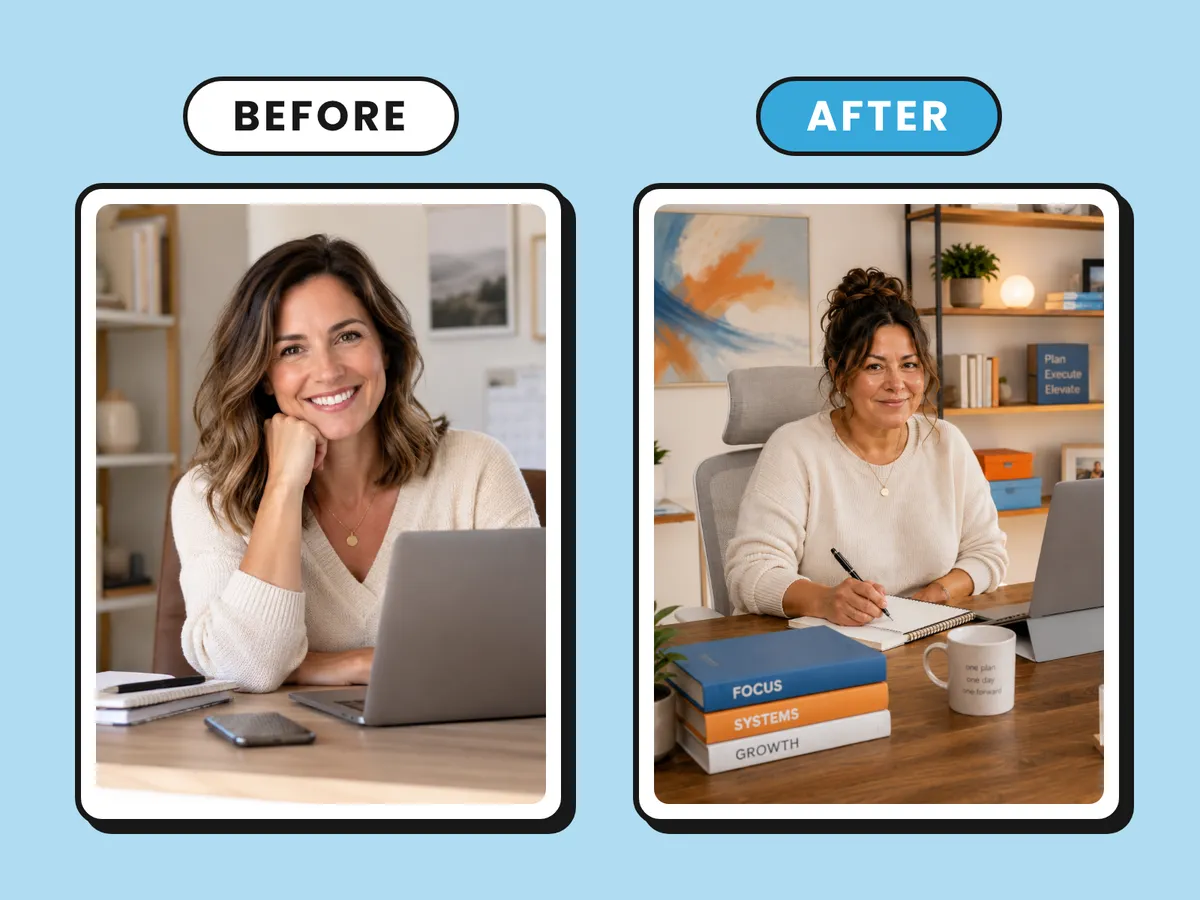
You need a post for a new service. Instead of hunting through stock or putting it off, you make an image that could only be yours: your colours, your people, your setting.
The explainer video you've meant to make for two years gets made. Your character looks the same in every post. Your product appears with its real label, in scenes you never had to shoot. And you only step in front of a camera if you want to.
It costs a fraction of the old way, too. A short social video from an Australian production company typically costs A$2,500 or more (Vidico, 2026 price guide). By my estimate, a first short video made with AI tools costs about A$0 to A$75 in AI credits, depending on the tools you use and how many tries each shot takes.
Your cast is your people, your products, your mascot and the places they appear. Your crew is your AI tools, plus a skill for every step, handed to you session by session, that does the repeatable work with you. You're the director. You decide what the shot needs, your crew makes it, and nothing goes out until you're happy with it.
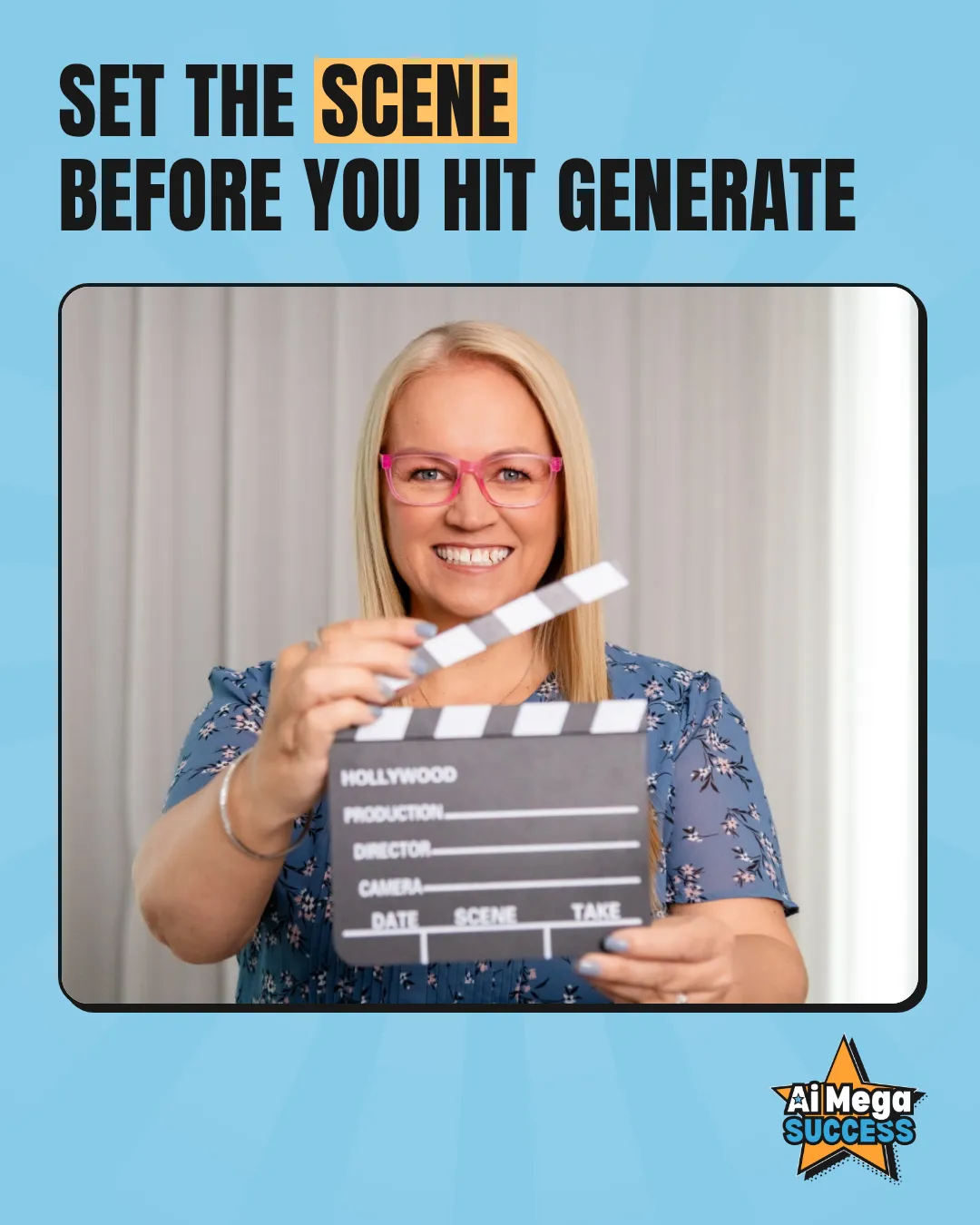
You'll direct them with my SCENE framework: Style, Cast, Environment, Nail the shot and Edit. Set the SCENE before you hit generate, and AI stops guessing what your business looks like. Build your look once, and you can direct it again and again.
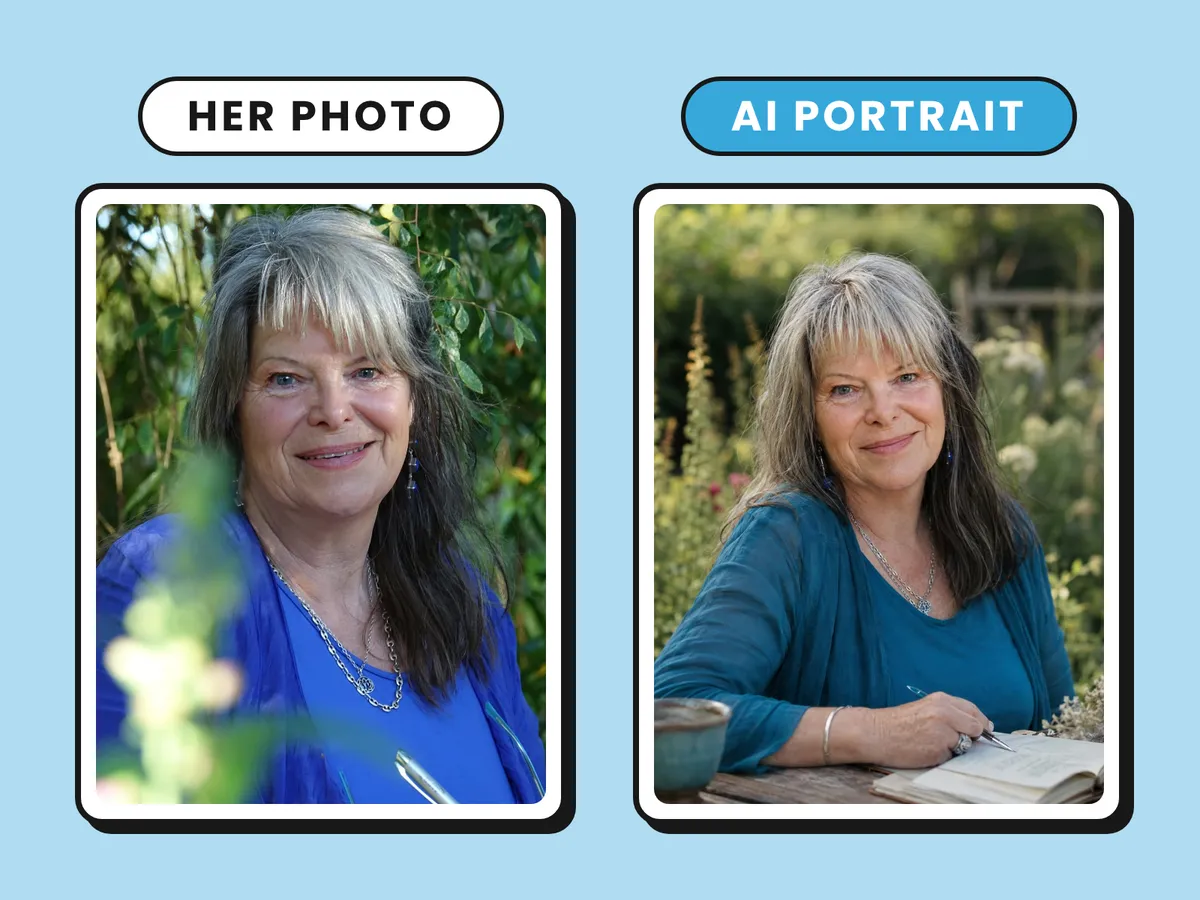
Pic 1 a photo of me in my garden. Pic 2 an AI generated photo of me based on pic 1. Since posting pic 2 I have had so many comments about how the photographer has captured the real Linnet, which I agree with. No other photo I have has quite got that look I was always wanting... I'm so self conscious in front of the camera... also note how Jac (my AI assistant) has given me a teal Wild Sky branded outfit without explicit instruction by referring to brand guide. So impressed! Thank you Loren Bartley... what a gift!
Linnet Hunter
Wild Sky
This is an AI MegaClass, so you're not watching me make things. You build alongside me, session by session, and everything you make is yours to keep.
Each session builds on the last but stands on its own, with homework in between.
S: Style
Ready to watch now
Teach AI how you look. You'll finish with the first draft of your Visual Design System, set up in Claude Design, plus your first on-brand design made with it.
C: Cast, E: Environment
Mon 16 Nov, 9:30am to 12pm AEDT
Lock in your cast and your settings. You'll leave with your Visual Library set up, a character consistency sheet for your main cast member and an environment sheet started.
N: Nail the shot, E: Edit (images)
Wed 18 Nov, 9:30am to 12pm AEDT
Direct the still image. You'll leave with your first set of on-brand images, ready to use in your content or as the starting frames for your first video.
N: Nail the shot, E: Edit (video)
Fri 20 Nov, 9:30am to 12pm AEDT
Bring it to life. You'll leave with your first short video storyboarded, its first shots brought to life and the whole thing laid out with sound, ready to finish.
Ready to watch now | A bonus for every AI MegaClass buyer
You've probably already taught AI how you sound. Now it's time to teach it how you look.
If your AI designs come out looking like everyone else's, with a different look every time, this is where that changes. Starting with the brand assets you already have and love, you'll build your Visual Design System with me, step by step.
You'll finish with the first draft of your Visual Design System, set up in Claude Design, your first on-brand design made with it, and a skill to help you finish it as homework. Every character, image and video you create in the rest of the AI MegaClass builds on it.
Join now and the replay and the skill are yours straight away, so you can start today.
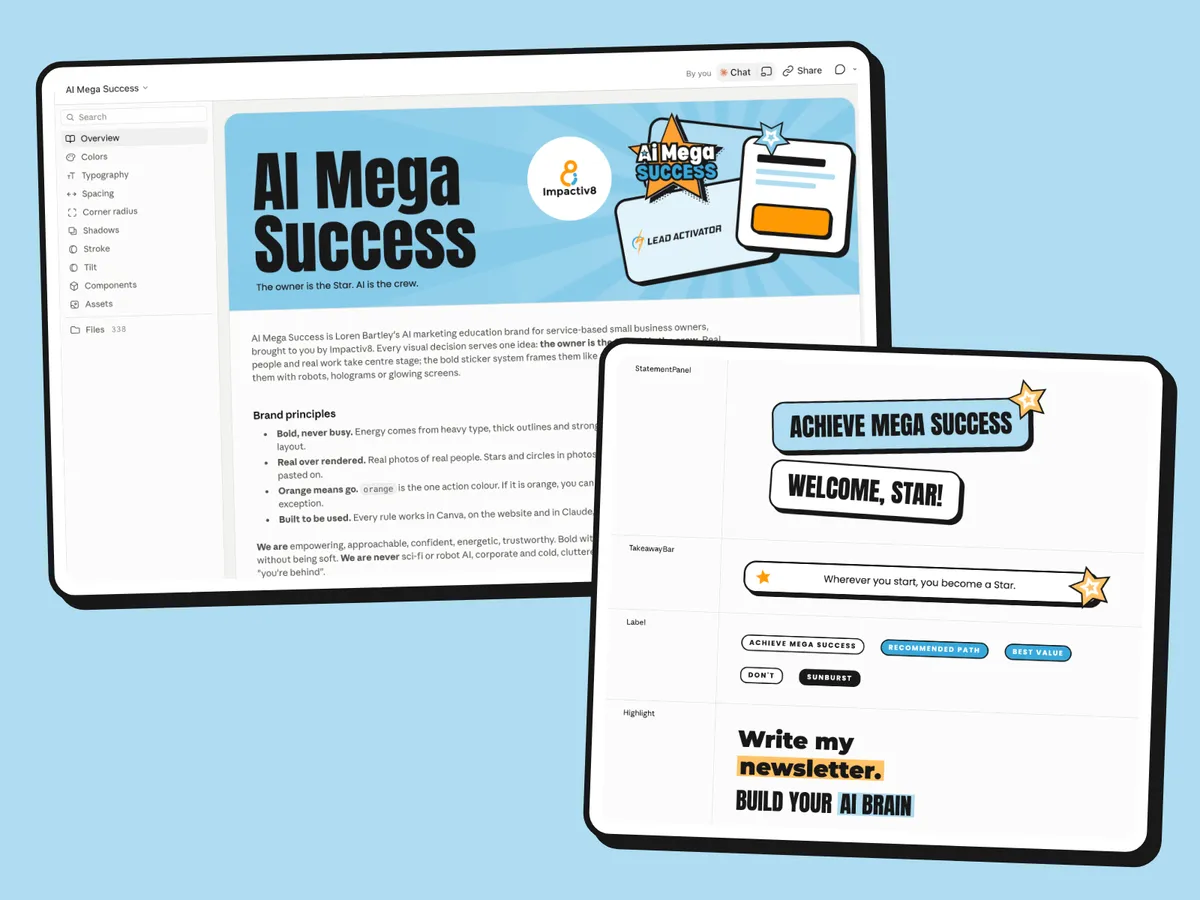
In this hands-on AI MegaDrop, you'll use my STAMP method:
Mon 16 Nov, 9:30am to 12pm AEDT
Ever had AI give you the perfect image of your character, then a completely different person in the next one? That's drift, and it's what makes AI visuals look like they came from ten different businesses.
In Part 1, you'll lock in your cast and the places they appear, so they look the same in shot one and shot one hundred. Your cast can be you, a person you create, your product or a mascot, and you can appear in your marketing without ever filming yourself.
You'll leave with your Visual Library set up, a character consistency sheet for your main cast member and an environment sheet started for the place you use most.
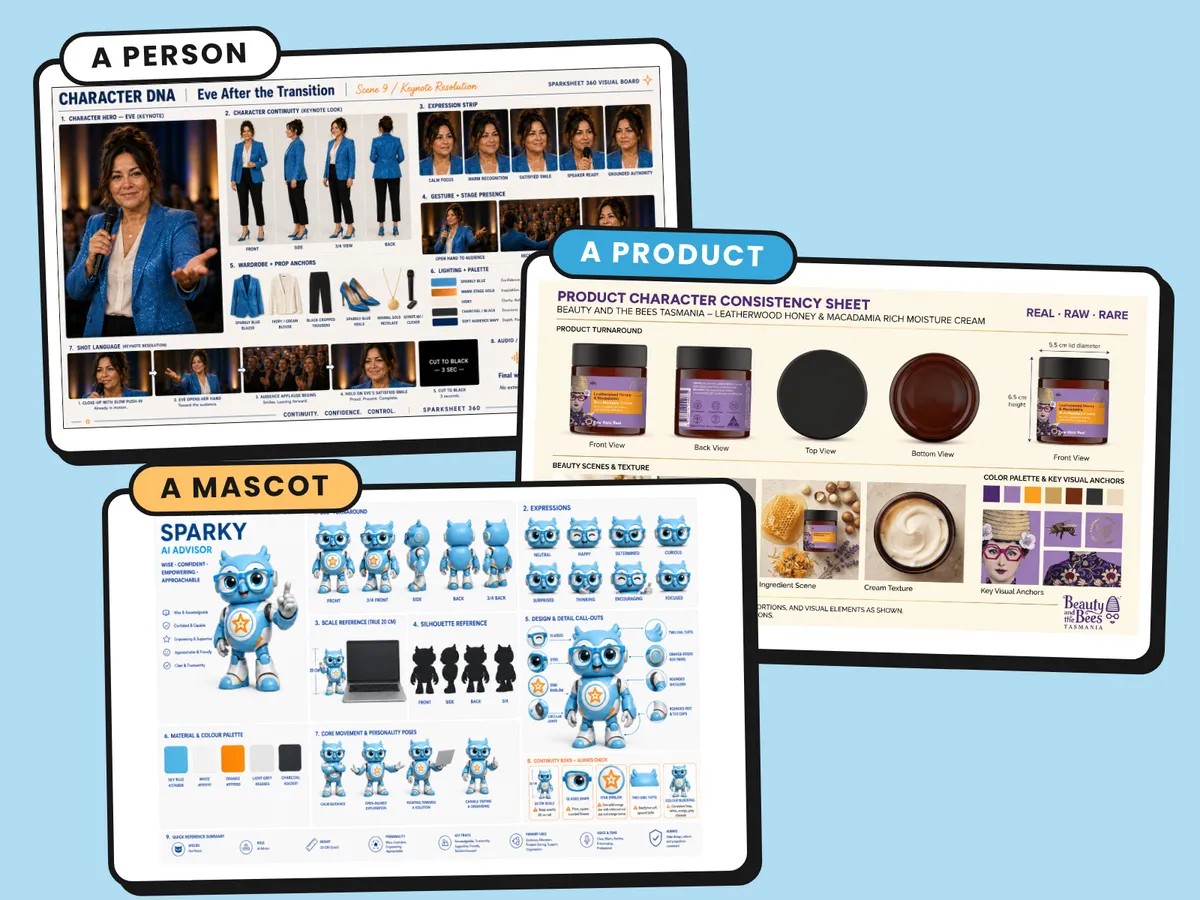
You'll start by setting up your Visual Library and your Visual Content System project in Claude, the home for everything you build across the series. Then you'll follow my DOUBLE method, step by step: decide on your cast member, organise the right references, lock in their unmistakables (the details that must never change), build the sheet, look it over, then enter it in your Visual Library. Your sheet becomes your cast's double, standing in for them in every shot. You'll use the same method for your settings, whether that's your real clinic, studio or office, or a place you invent.
No mascot? No problem. People characters are a full path of their own.
Missed the AI MegaDrop? Bring your brand guide or Canva Brand Kit and a few brand photos, and you'll be right.
Wed 18 Nov, 9:30am to 12pm AEDT
Ever had AI give you an image that's almost right, then spent the next hour (and a pile of credits) regenerating it, only to end up further away? Near enough isn't good enough when it's your business on the screen.
In Part 2, you'll bring your look, your cast and your settings together, direct each shot the way a photographer would and fix the near-misses one change at a time, without starting again, in whichever image tool you use.
You'll leave with your first set of on-brand images, ready for your content or as the starting frames for your first video, plus a skill that directs each shot with you.
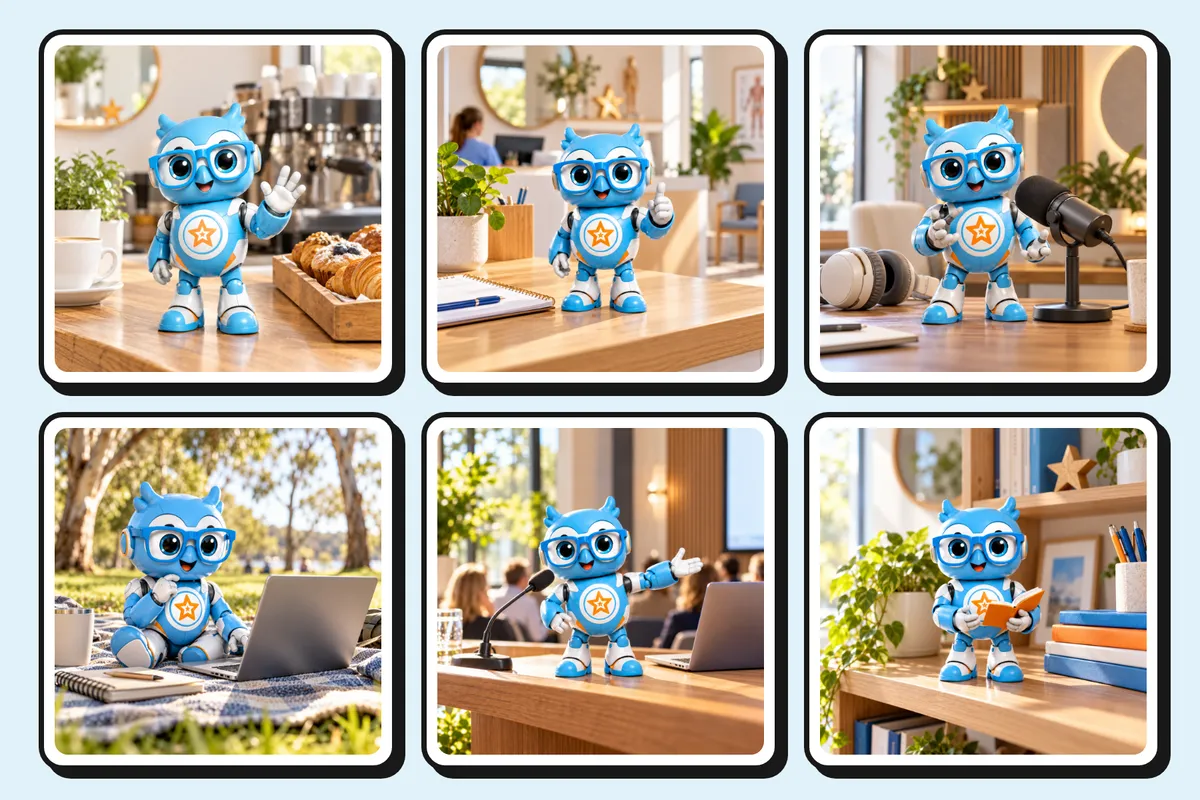
You'll follow my PICTURE method, the production process you'll use for images today and for video in Part 3. Get clear on the purpose, plan your shots, create the stills, refine and finish them, then expand one good image into many and enter the keepers in your Visual Library.
Directing a shot covers who's in it and what they're doing, the camera angle, the mood and the light, the setting, the format, and anything to avoid. Then you'll finish your images with your exact words and your real logo, using the templates in your Visual Design System.
Choose the images that matter most to you. Make images for your content, from social posts and carousels to product shots and you in scenes you never had to shoot. Or make the starting frames for the video you'll create in Part 3, so you arrive ready to bring them to life.
Missed Part 1 or the AI MegaDrop? Bring your brand guide or Canva Brand Kit, a few brand photos, and clear photos of your product, yourself or your mascot, and you'll be right.
Fri 20 Nov, 9:30am to 12pm AEDT
Has video been sitting in your too-hard basket for years? Or have you tried AI video, burned through a pile of credits, and ended up with clips that drift, morph and sound like nothing at all?
In Part 3, you'll bring your cast and your settings to life. You'll direct what moves, how the camera moves and how long each shot lasts, draft cheaply so your credits go on the shots you'll use, and give sound its due, because sound is half of what makes a video feel professional. You don't have to be on camera, unless you want to be.
Choose the video that matters most to you: a short story starring your mascot or character, like Sparky's here, your product in action, your place, or you without filming a thing.
You'll leave with your first short video storyboarded, its first shots brought to life and laid out with sound, ready to finish. One video becomes versions for Reels, your website and everywhere else you post.
You'll finish my PICTURE method, the same production process you used for your images, now for video. Imagine it shot by shot in a simple storyboard, turn your stills into moving shots, underscore it with voice, music and sound effects, then refine and finish it, expand one video into many and enter it in your Visual Library.
Then you'll pull it all together into a rough cut, fix the one shot that's off without redoing the rest, and add captions and your real logo.
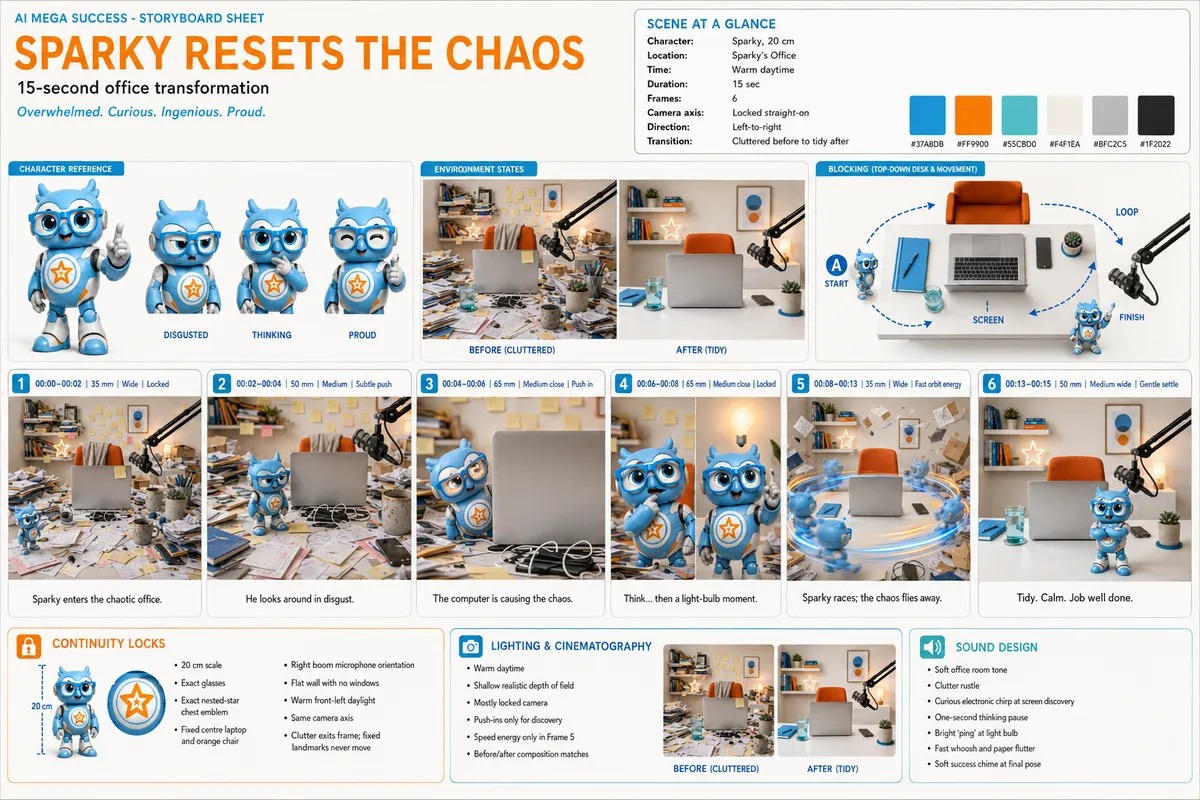
The storyboard behind Sparky's video: six timed shots, his character reference and the office before and after. Click to enlarge.
Missed the earlier sessions? Bring a few images you're happy with, or clear photos of your product, your place, yourself or your mascot, and you'll be right.
You don't need to have done my earlier classes, and you don't need to be a Claude expert. If you already use an AI tool, you've got what you need to start.
Every buyer gets the AI MegaDrop as a bonus, straight away, so you start with your look in place like everyone else. New to Claude? A short orientation gets you set up first. Miss a session and you'll know exactly what to bring to the next one.
Done Build Your AI Authority Engine or the Content Accelerator? This picks up where they left off and takes your visual brief, your character and your prompts much further.
Already a Star? Your place is complimentary. There's nothing to buy or claim: we've already added you, and your joining details are in your inbox.
You'll need the Claude desktop app on a paid plan (Claude Pro is from about A$30 a month, and Claude Design is included) and one image tool. The full list, and what's free, is in the FAQ below, and a tools and pricing guide arrives before Part 1.
You know how this goes. The video stays on the someday list. Posts go out with a stock photo that could belong to anyone, or don't go out at all. Every time you try AI, you start from a blank prompt, burn a few more credits and end up with something that doesn't look like you.
That's not because you're doing anything wrong. There's just no system behind your visuals, so every one of them is a one-off.
Build the system once and that changes. Your look, your cast and your settings are ready every time, and you're directing instead of starting over.
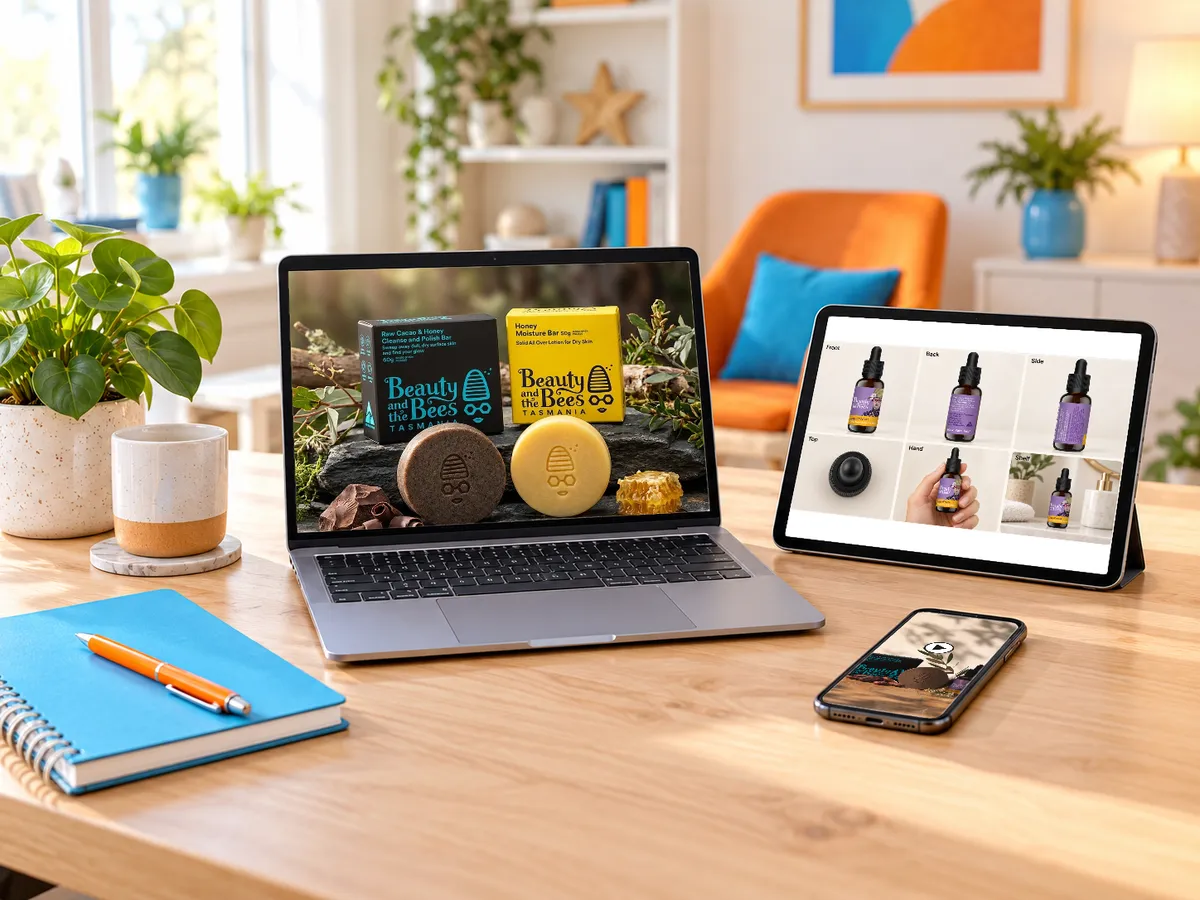
Total value: over $2,388. Yours for AU$247 until 5pm AEDT Mon 30 Nov.
Every session has time to build alongside me. You leave with things made, not a list of things to do later.
You won't just learn it on the day. You'll leave with a skill for every step, so you keep making visuals long after the class ends.
Everything starts from your own brand, characters and settings, so what you make looks like your business, not stock or slop.
SCENE and your Visual Library come with you to whatever tool is next. Every new tool is just a new camera.

Loren Bartley is an AI marketing educator and digital marketing strategist, and the founder of Impactiv8. She teaches service-based business owners how to build profitable marketing systems in partnership with AI. She calls it Human-Led AI Marketing: you stay in charge, and AI is the partner.
Earlier this year she presented "You + AI: Becoming the Go-To Expert in Your Niche" at AI Business World, the AI conference within Social Media Marketing World, to a packed room of more than 500. They put the Session Full sign on the door and turned people away.
She uses the system she teaches. Sparky, the owl-robot AI advisor you'll see across AI Mega Success, and Eve, the character in her Success Journey music video, were both made this way. Years ago, animating her logo took a team member several days. Now it takes her minutes.
With over 15 years in digital marketing, she's known for making complex topics simple, practical and doable, even if you don't think of yourself as techy. She also spends 10 to 30 hours a week researching and testing AI, so you don't have to.
You're in expert hands.
Real small business owners, in their own words.
Loren doesn't just teach the theory, she provides you something you can put to work immediately, and it's already changing how I run my business.
Marietta Mehanni
mSwing and My Group Move
The fact that we implemented as we worked through the AI MegaClass, was such a good use of time too. We all know how easy it is to think you will do it later!
Kerryn Powell
The Network Catalyst
I went home and used what I learnt in Loren's session straight away and haven't looked back since! Thanks for giving me the confidence to step out of my comfort zone and create a point of difference!
Diane Tabbagh
Wyndham City
I went into the AI Marketing MegaClass as a complete newbie... The quality was very good with strategy, practical content...
Graham Evans
Strike Sports
...[it] HAS ALREADY CREATED THE CANVA GRAPHIC, USING MY TEMPLATE FOR MEMBER SPOTLIGHTS! BLOODY BRILLIANT! All I had to do was update the photo.
Lizzy Jacobs
Cowork and Create
Imagine saying:
Wherever they see you, it's unmistakably yours.
Your visuals finally match the quality of what you deliver.
Less on stock, shoots and freelancers for the content you need every week.
A library of brand assets that's worth more every time you use it.
That isn't a someday version of your marketing. You can start building it today.
All prices are in AUD and include GST.
AU$297
Early-bird until 5pm AEDT Mon 30 Nov, then AU$297.
Three live parts on Zoom: Mon 16, Wed 18 and Fri 20 Nov
Bonus AI MegaDrop: Build Your Visual Design System, ready to watch now
Replays of every session, up within a few hours of each session
Your AI crew: a skill for every step, yours to keep
Your getting-started kit
Your online workbook, with setup steps, session guides and every resource in one place
30-day money-back guarantee
2 x AU$152
One month apart. Early-bird until 5pm AEDT Mon 30 Nov, then 2 x AU$152.
Everything in Pay in full, in two monthly payments
30-day money-back guarantee
Already a Star? Your place is complimentary. There's nothing to buy or claim: we've already added you, and your joining details are in your inbox.
After checkout, you'll be offered one optional extra: your first 30 days in the AI Mega Success Academy, free, for support between the sessions.
Come along to the sessions. If you don't find the AI MegaClass valuable, email us by Wed 16 Dec, 30 days from Part 1, for a full refund. No questions asked. Buying after the live sessions? Your 30 days start from the day you buy.
Save my seatJoin today and you'll get the replay and its skill straight away, so your look is in place before Part 1 on Mon 16 Nov. Everything in Part 1 builds on it.
The checklist gets your brand assets into one folder, ready for the AI MegaDrop. The sooner you're in, the less of a rush it is.
Parts 1 to 3 run live on 16, 18 and 20 Nov. Live is where you get your questions answered as you build.
It's AU$247 now and AU$297 from 1 Dec, whether you join live or work through the replays.
Service-based small business owners who do their own marketing and already use an AI tool. It's for you if your visuals are few and far between, rely on stock or don't look like your business, or if video's stuck in the too-hard basket. It's also for you if you're already making AI images or video but burning credits or getting slop. And if you outsource your visuals, you'll understand the process well enough to brief whoever makes them, or to decide what to hand over. If you sell products as well as services, Part 1 has a product track. It isn't for anyone after a one-click button, anyone who won't spend anything on tools, or anyone wanting to use someone else's face, characters or brand.
The class is AU$247 until 5pm AEDT Mon 30 Nov. For tools, you'll need Claude on a paid plan (from about A$30 a month) and one image tool. The free versions of ChatGPT and Gemini work, but you might hit a daily limit, so a paid plan helps: Google AI Plus is A$7.99 a month and ChatGPT Plus is from about A$30. For video, you can start with Google Flow's free daily credits and edit in the free version of CapCut or Canva. That same Google AI Plus plan gives you more video credits and sharper video, and I'll also show you a higher-budget option for when you're ready. A tools and pricing guide arrives before Part 1.
Just one optional extra. After checkout, you'll be offered your first 30 days in the AI Mega Success Academy free, for support between the sessions and after the class ends. If you stay, it's AU$127 a month (advertised at AU$147). Cancel at any time in your portal or by email. Members get 150+ trainings and every future AI MegaClass free while they're a member. It's only offered once you've bought the class, so there's nothing to decide now.
The Claude desktop app (Mac or Windows) on a paid plan, from the AI MegaDrop. Claude Pro is from about A$30 a month, and Claude Design is included. From Part 1, you'll also need one image tool, ideally paid. Canva is optional for Part 2, and some of its AI editing tools need Canva Pro. For Part 3, you'll use Google Flow for video (its free daily credits work) and CapCut or Canva to edit (the free versions work). Suno is optional for music; you'll need a paid plan to use its music in your business. On a Team or Enterprise plan? Check with your account owner that design systems are switched on.
Claude is where your Visual Design System, your Visual Library and your skills live, so yes, you'll need it. For the images themselves, you can use ChatGPT or Gemini. Think of your image tool as the camera. Every new tool is just a new camera.
Yes. It's a bonus for every buyer, and you get the replay and its skill as soon as you join. Already a Star? Your place in the AI MegaClass is complimentary. There's nothing to buy or claim: we've already added you, and your joining details are in your inbox.
No. You'll pick a direction from options rather than starting from a blank page, and directing is just describing what you'd tell a photographer. You already know what suits your business.
Yes. Use a mascot, a character you create, your product or an animated character. Or use an AI clone of yourself and appear in your marketing without filming.
Yes, if you'd like one. An AI clone is one of several styles you'll be able to choose from, alongside mascots, characters you create, your products and animated characters. It won't be for everyone, and you don't have to make one. But if you want to, we've got you covered.
You don't need one. There are two paths the whole way through: a mascot, like my Sparky, or people characters, like Eve, a character I created.
There's a reason the Macquarie Dictionary named "AI slop" its 2025 word of the year. It's what you get when nobody's directing. Your look, characters that stay consistent, directing rather than describing, and a check before anything goes out are what stop it.
You'll create your own characters, never someone else's, and use real people only with their permission. You'll keep a record of how each character was made and whose likeness it is, and label AI content where platforms ask for it.
The tools will change. SCENE and your Visual Library won't, and they come with you to whatever tool comes next.
Replays go up within a few hours of each session, and each session stands on its own. If you miss one, you'll know exactly what to bring to the next.
The replays, the skills, the pre-work checklist and the orientation, straight away. Your 30-day guarantee starts from the day you buy.
No. It picks up from there: your visual brief becomes a full Visual Design System, one character reference becomes full character and environment sheets, and a prompt formula becomes directing a shot, then a whole video.
Yes. Your Visual Design System, Visual Library, sheets and skills are all yours.
Yes. If you don't find the AI MegaClass valuable, email us by Wed 16 Dec, 30 days from Part 1, for a full refund, no questions asked. Buying after the live sessions? Your 30 days start from the day you buy.
Book a free 15-minute chat with me. We'll work out together whether it's the right fit for you, and if it isn't, I'll tell you.
You've already got the tools. This is where they become a system: your look, your cast and your settings, ready whenever you need an image or a video, without a massive production budget. It starts with the AI MegaDrop, yours as soon as you join.
Save my seatSet the SCENE before you hit generate.